Showing posts with label Efficiency. Show all posts

Tuesday, March 28, 2017

The Latest Guide Targets Data Center Metering and Energy Use

Developed by the U.S. Department of Energy, the new guide is designed to implement a metering system for data centers. The metering system enables organizations to gather necessary data for effective decision-making and energy-efficiency improvements. The guide’s focus is on the necessary data calculating the power-usage effectiveness (PUE) metric.


Please download the whole guide from the Lawrence Berkeley National Laboratory, U.S. Department of Energy:

https://datacenters.lbl.gov/resources/data-center-metering-and-resource-guide


About the Blog


Strategic Media Asia (SMA) is one of the approved CPD course providers of the Chartered Institution of Building Services Engineers (CIBSE) UK. The team exists to provide an interactive environment and opportunities for members of ICT industry and facilities' engineers to exchange professional views and experience.

SMA connects IT, Facilities and Design. For Data Center Design Consideration, please visit 


(1) Site Selection,
(2) Space Planning,
(3) Cooling,
(4) Redundancy,
(5) Fire Suppression,
(6) Meet Me Rooms,
(7) UPS Selection, and
(8) Raised Floor

All topics focus on key components and provide technical advice and recommendations for designing a data center and critical facilities.


Wednesday, April 16, 2014

Data Center with Building Management System (BMS)

Most commercial buildings today integrate a number of different systems, ranging from power distribution to heating and cooling to physical security. Perhaps no facility is a better example than the data center which enables continuous operation of sensitive IT equipment and networks.

Keeping eyes on all the systems necessary for functioning a data center is virtually impossible unless you are using some form of management system.


Building Management System (BMS) with Data Center


Let's temporary ignore the networking and IT facilities, a typical data center must provide consistent, stable power, even in the event of a utility outage, as well as cooling, physical site security, lighting, fire suppression and other systems. Although many of these are common to a typical office building, their use in a data center requires added capabilities or special measures owing to the critical purposes. For instance, fire suppression should ideally enable extinguishing fires without destroying servers and other equipment.


Even with monitoring equipment in place, such as temperature and humidity sensors, power monitoring, various security measures and so on, it may be not practical to hire personnel to record the measurements or simply keep an eye on all these facilities. In this case, automation can be done through Building Management System (BMS).


A BMS handles the work of monitoring and recording data for various infrastructure systems. It also adjust the operation of these systems automatically to maximize the uptime and the operating efficiency. There are a few areas where building management systems can play an important role in the data center:


(1) Physical Security - A BMS can record who is entering secure areas of a facility via key cards or biometrics. Furthermore, it can implement various access-control measures, such as limiting access during certain times of the day or permitting certain personnel access to some areas but not others.


(2) Lighting Control - Servers may not need light to work, but people do. Unfortunately, owing to neglect or simply impracticality, lighting can become a major source of energy waste and thus decreased efficiency. A BMS can ensure that lights are shut off during off hours or when no motion is detected in a given area for some specified span of time.


(3) Efficient Cooling - As data centers move toward free cooling, air-side or water-side economizers and traditional mechanical cooling must function together in a manner that maximizes efficiency but still protects IT equipment. A BMS can balance these considerations. For instance, to run in economizer mode when the outside temperature is sufficiently low but to switch to CRAC units or water chillers when extra cooling is needed. If a hot spot develops, for instance, the BMS could increase air circulation at that point (if possible) or simply increase cooling to the appropriate area (or the entire facility).


(4) Power Distribution - Ensuring steady and clean power supply for the IT equipment is critical to keeping the data center running. A BMS monitors power conditions and provides alerts in the event of failure at some points in the power distribution system. In addition, the BMS can record data on power usage and conditions, enabling analysis for potential problems.


(5) Remote Monitoring Capability - When equipped with remote monitoring and alerts, the BMS can enable a facilities manager to keep an eye on conditions from another location—such as at home on a desktop computer or on the road via a laptop or tablet.


(6) Maintenance Scheduling - Data center maintenance is critical to keeping systems functioning. A BMS can indicate when infrastructure requires regularly scheduled maintenance, or when conditions merit preemptive maintenance to avoid a problem before it causes downtime. Automated maintenance reminders can prevent day-to-day tasks from causing employees and managers to forget periodic tasks that are necessary to the ongoing health of the facility.


(7) Enable Planning & Upgrades - The information that a BMS collects, in addition to providing a basis for maintenance and troubleshooting, can aid in planning for data center expansions or upgrades. For instance, power usage data relative to maximum capacity might indicate the need for greater capacity when additional IT equipment is installed.


(8) Improve Efficiency - Hardly the least concern of data center managers is increasing the efficiency of their facilities. Data collected by the BMS can be critical to determining which measures will increase efficiency and (potentially) by how much.


A building management system generally focuses on data center facilities. In some sense, a BMS could be considered a subset of the functions included in data center infrastructure management (DCIM). In the quest for greater integration and ultimate single-pane-of-glass monitoring and control of the data center, then, a BMS might be taken into account monitoring and controlling all aspects of the data center, including IT.


On the other hand, if you include IT functions in the scope of a BMS, then data center infrastructure management is simply a type of building management system specific to the needs of IT facilities.


Regardless of whether you differentiate DCIM from BMS, these systems illustrate the move of data centers toward greater integration of various systems and the centralized control and monitoring of the entire facility. A BMS enables data center managers to more promptly respond to problems as well as to identify, diagnose and address potential problems before they affect operations.


About Strategic Media Asia Limited


Strategic Media Asia (SMA, www.stmedia-asia.com) is a leading technical training and event organizer for corporations specialized in data center design & build, E&M facilities, telecom, ICT, finance and colocation. Currently, SMA delivers a series of data center trainings and qualification programs in Hong Kong, Taiwan and Macau.

All these events / training seminars are designed to support the leadership needs of senior executives (Chief Information Officers, IT Directors / Managers, Facilities Managers, company decision makers, etc.) and to provide useful and applicable knowledge.


Tuesday, November 12, 2013

Data Center Design: Battery-based / Static UPS or Rotary UPS?

UPSs vary greatly in physical size, weight, form factor (e.g., standalone vs. rack-based), capacity, supported input power source (e.g., single phase vs. 3-phase), technological design, and cost.

When considering the procurement of a UPS for a data center or other mission critical facility, there are a number of design and acquisition decisions to make such as:


  1. The size of the load to be protected
  2. The battery runtime required
  3. The proper input and output voltages
  4. The right type of system (i.e. on-line, line-interactive, etc.)
  5. Pricing and performance seen within manufacturer product portfolios
  6. The advances in technologies
  7. The ideal level of redundancy (i.e., N, N+1, 2N, 2N+1, etc.)
  8. The required output distribution


This time our focus will be limited to comparing 3-phase battery-based UPS and rotary UPSs that support data centers. Some of the common 3-phase UPS architectures are listed below:


- Double Conversion On-Line UPS
- Delta Conversion On-Line UPS
- Engine-coupled Rotary UPS
- Flywheel UPS


Other Single phase UPS systems (will be discussed later):


  • Standby UPS (single-phase load ranges from 100 to 1,500 VA)
  • Line Interactive UPS (single-phase load ranges from 0.5 to 10 kVA)
  • Standby Ferro UPS (single-phase load ranges from 3 to 15 kVA)


Double Conversion On-Line UPS

This design is by far the most common type for loads above 10 kVA. A double conversion UPS is considered ‘on-line’ because its nearly ideal output waveform is derived completely from battery power through its inverter. As such, this isolates the output from the input. The input primarily serves to continually charge the battery.

Therefore, during an AC power failure, on-line operation results in no transfer time. Since 100% of the load power is converted twice, once from AC to DC (to charge the battery) and a second time from DC to AC (for the output), a double conversion UPS is inherently less efficient than offline UPS types.

These UPSs are available in a broad range of sizes for three-phase loads from 10 to 1,000 kVA. Furthermore, these UPSs can be arranged in a vast array of configurations to achieve high availability for very large three-phase data center loads.


Delta Conversion On-Line UPS

That design is a more recent topology that was originally patented and utilized exclusively by APC for its Silcon-series 3-phase UPS line.

The advantage of this topology is its energy efficiency. It achieves high efficiency by not processing 100% of the power, 100% of the time, as is the case with a double conversion UPS.

Rather, it processes only the portion of the power that is outside of the ‘window’ of an acceptable power waveform, while at the same time having an output that is on-line with load such that there is only a load step change from steady-state to full battery-load operation. As such, this technology is best suited for the highest power applications and well above 1,000 kW.


Engine-coupled Rotary UPS

A rotary UPS is one that unlike the prior approaches does not rely on electronics to pass through or recreate an output AC waveform. Rather, a rotary UPS relies on a mechanical motor and generator to create a pure sine wave output without the need for filter capacitors. Additionally, the resulting low input impedance allows the ability to handle any type of load no matter how ‘dirty’ it may be.


Also, this approach yields an ability to handle high fault currents and provide isolation from high harmonic load input currents. Finally, a rotary UPS can be configured to use direct diesel bypass. By comparison, a static (or battery-based) UPS, can only source its load from a generator in a ‘break before make’ fashion. Due to the nature of its ability to handle ‘difficult’ loads, rotary UPSs are large in size and expensive. As such, they are reserved for large loads in excess of 1,000 kW.


The advantages of Rotary UPS:

  1. Most energy efficient UPS/CPS system
  2. Use of stored kinetic energy
  3. No batteries required, that means no chemical waste!
  4. Save energy for battery room's ventilation and cooling 
  5. Lowest Total Cost of Ownership (TCO)
  6. Highest power factor
  7. No conditioned battery room required, that means saving space
  8. Long life time
  9. Efficiency about 96%


Flywheel UPS

Flywheel UPS system is similar to the settings of battery-based UPS system. The rotary UPS is called “rotary” because rotating components (such as a motor-generator) within the UPS are used to transfer power to the load. The true definition of a rotary UPS is any UPS whose output sine wave is the result of rotating generation. Therefore, the UPS in Figure below, although it utilizes a flywheel as a rotating temporary energy storage source in case the utility fails, is not, by definition, a rotary UPS.


About The Blogger


Strategic Media Asia (SMA, www.stmedia-asia.com) is a leading technical training and event organizer for corporations specialized in data center design & build, E&M facilities, telecom, ICT, finance and colocation. Currently, SMA delivers a series of data center trainings and qualification programs in Hong Kong, Taiwan and Macau.

All these events / training seminars are designed to support the leadership needs of senior executives (Chief Information Officers, IT Directors / Managers, Facilities Managers, company decision makers, etc.) and to provide useful and applicable knowledge.

For detail, please visit our data center courses & training seminars at http://www.stmedia-asia.com/trainings.html.


Tuesday, May 14, 2013

How to Upgrade your Data Center and Critical Facilities?


An aging data center may no longer be able to meet the power, cooling and structural demands of advancing technologies, but few businesses have the time or the capital to build new facilities.

Fortunately, organizations can extend the working life of their data center by renovating the facility by making changes that cost little to nothing. Data center upgrades allow a business to adopt new standards and improve existing infrastructures to introduce new technologies with better performance and more efficiency.

There are several data center design changes that can extend the life of your facilities and data center


(1) Elevate your data center temperature


The data center's working temperature has long been a subject of myth and legend, but research and initiatives from industry organizations such as  the American Society of Heating, Refrigerating and Air-Conditioning Engineers (ASHRAE) have found that data centers don't need to be cooled like meat lockers. Modern servers and other computing equipment can operate reliably at elevated temperatures.

A 2008 ASHRAE document recommended a temperature range from 65 to 80 degrees Fahrenheit for Class 1 data center equipment. Recommendations in 2011 broadened the allowable temperature range from 59 to 90 degrees Fahrenheit for enterprise-class servers and 41 to 113 degrees Fahrenheit for appropriately designed servers and other equipment.

In addition, the extended temperature range also makes it possible to adopt alternative or supplemental cooling schemes (at least during certain parts of the day), such as free air or air/water economizers -- cooling technologies that might not have even been considered when your data center was first built.


(2) Upgrade servers and systems for better consolidation and efficiency


Servers consume the majority of energy in a data center -- primarily in the processors and memory components. Organizations can gain significant energy efficiency by upgrading servers to more efficient models during normal technology refresh cycles where capital is already budgeted. The newer server may also provide greater amounts of memory, allowing a virtualized server to provide much higher levels of consolidation than earlier servers.

This means the same amount of computing work can be done with far fewer servers, saving equipment capital and generating only a fraction of the heat for a data center's cooling system to contend with.


(3) Change the system layout and rack layout for power and cooling efficiency


It is a matter of Hot Aisle & Cold Aisle.

Suppose you had a traditional data center where a large computer room air-conditioning unit (CRAC) cooled the room. Now imagine that a server refresh and consolidation project slashed the number of servers by 75%. With just a quarter of the original server count in this example, it may be possible to rearrange the remaining servers in far fewer racks and use containment to enclose the remaining servers. This limits the air volume that must be cooled, significantly reducing the amount of mechanical cooling needed and allowing for alternative cooling technologies.

In other cases, under-floor cooling may be more effective by reworking the electrical cabling, network cabling and water lines that cross below the floor.

A poorly designed and haphazard layout can obstruct cooling air distribution, making more work for the mechanical cooling unit. In addition, any water distribution increases the potential for damage to electrical and network wiring, so many organizations opt to route electrical and network wiring overhead -- leaving water lines under-floor -- and may even upgrade network cabling to allow for future bandwidth improvements.

Don't overlook the rack space itself. For example, fully populating racks can concentrate more equipment in less space, making any containment -- and associated cooling -- more effective. And some racks may not be deep enough to accommodate new generations of computing equipment. This can lead to wiring congestion and airflow problems.


(4) Consider supplemental or alternative cooling schemes


Mechanical heating, ventilation and air conditioning (HVAC) systems are a staple of the modern data center, but they are also costly, energy-hungry and a potential single-point of failure in data center availability. If the cooling system fails, a data center can overheat in a matter of minutes.

Data center renovations often focus on ways to supplement or replace traditional mechanical cooling with alternative equipment or methods that are enabled by higher operating temperatures, better containment and less equipment.

Popular alternative cooling approaches include chilled water heat exchangers (water economizers), evaporation cooling and even free air cooling (air economizers).

These methods, however, require affordable environmental resources that are suited to the task and available for much of the day. For example, using cold lake water to drive a water economizer requires a nearby lake. In many cases, these alternative methods are added to supplement traditional HVAC, lowering run times and power needs.

Organizations that must continue using HVAC are taking a fresh look at the cooling system's capacity and efficiency. The potential problem is that a large, aging HVAC system runs even less efficiently if it is used infrequently; easing the cooling load on your legacy HVAC system might actually cost more and be harder on the mechanical system.

This means that raising operating temperatures and reducing the amount of computing equipment may justify a smaller cooling system.


(5) Consider availability and reliability issues in power distribution


Upgrading the uninterrupted power supply (UPS) systems to a newer model can improve UPS energy efficiency and provide more intelligent power monitoring/measurement capabilities that complement a data center infrastructure management scheme.

When a UPS is replaced, it is hopefully with a higher efficiency system, and may also become a redundant [N+1] configuration and possibly even a modular or incremental capacity solution. Power equipment upgrades may spawn broader wiring and distribution upgrades in older buildings.

It is also a common practice to upgrade in-rack power distribution units (PDUs) to add intelligent power management, along with rack temperature and humidity monitoring. With UPS and PDU upgrades together, an organization can gather energy use data and make more informed decisions about power costs in the data center.


(6) Finally, consider the availability of data center power


Organizations with aging, unreliable or overtaxed power grids may consider local co-generation options to ensure uninterrupted power. Traditional diesel generators are quickly giving way to more efficient and environmentally friendly alternatives, including solid oxide fuel cells such as Bloom Energy Servers or solar arrays to produce some amount of local electricity. If it's not possible to install local co-generation on-site, it may be possible to contract with regional co-generation providers for supplemental electricity.


About The Blogger

Strategic Media Asia (SMA, www.stmedia-asia.com) is a leading technical training and event organizer for corporations specialized in data center design & build, E&M facilities, telecom, ICT, finance and colocation. Currently, SMA delivers a series of data center trainings and qualification programs in Hong Kong, Taiwan and Macau.

All these events / training seminars are designed to support the leadership needs of senior executives (Chief Information Officers, IT Directors / Managers, Facilities Managers, company decision makers, etc.) and to provide useful and applicable knowledge.


Monday, March 18, 2013

Data Center Design & Critical Facilities - Join the Training Seminar & Event Series


Half Day Event on IT & Critical Infrastructure


ICT technology is widely used in a city’s infrastructure development, such as large scale data centres, building and architectural modelling, optimal electric power generation and distribution and supervisory control and data acquisition of railway and transportation systems. There are more and more stakeholders such as researchers, developers, providers, and applications/users involved in the corresponding technology development.


The half day event aims to provide a forum for government officials, university researchers, and key industry professionals to share with other fellow colleagues the latest ICT technology development and applications, as well as its potential for local ICT industry.


Date: 12 April 2013
Venue: The Hong Kong Productivity Council Building
Organizer: ICT Section of IET Hong Kong and OGCIO, the HKSAR Government


Event Detail: http://www.theiet.org/events/local/175263.cfm


Training Seminars on Data Center Facilities & HVAC Design
Bundled with Data Center Technical Visit on 28 March 2013


Further to the half day event, we introduce critical infrastructure systems that support a typical data center and prepare individuals to fully understand the main components that facilitate data center design & build by exploring the standards of TIA-942 and Uptime Tier levels.


The training seminars explain key challenges and consider different criteria, from design, testing, commissioning, sustainability and efficiency, of HVAC (Heating, Ventilation, and Air Conditioning) system in a data center.


Part I – Data Center Facilities Design and Infrastructure Engineering
Date: 18 – 19 July 2013 (Wednesday - Thursday, 2-day)

Part II – HVAC Design and Cooling Specialist for Data Center
Date: To be announced very soon


Target Audience:
Data Center Operators, Consultants, Facilities Managers, E&M Engineers, IT Management, etc.


Time: 10:00 – 17:30
Venue: 1st Floor, Innocentre, 72 Tat Chee Avenue, Kowloon Tong, Hong Kong
Special Rate: 10% Discount on Registration Fee


Speakers:

C.K. Chan, CEng, MIET, MHKIE, CSME, REW H0 C0
Edmond Fok, CEng, IntPE, MCIBSE, MIFireE, REW H0 C0
Herman Poon, CEng, Eur. Ing., CITP, MBCS, MHKIE
Joe Tang, CEng, MIET, MCIBSE, MASHRAE


Worldwide Accredited Data Center Qualification
Jointly Organised with CNet Training, UK


Certified Data Center Management Professional (CDCMP)
Core Unit (3-day) + Advanced Professional Unit (4-day)
Accredited by BTEC, Edexcel and BICSI


Commencing Date: 19 June 2013


Instructors from UK will lead the whole program:
http://www.cnet-training.com/delivered-by-expert-instructors/


Enrolment & Registration Details


Please refer to our website (www.stmedia-asia.com/trainings.html) or a registration form attached. A data center technical visit (sponsored by KDDI Hong Kong Limited) will be arranged. For detail, please visit www.stmedia-asia.com/data-center-tour.html

Monday, February 18, 2013

Data Center CFD Modeling becomes user-friendly

Over the past several years, Computational Fluid Dynamics (CFD) modeling has proven to be a reliable method for optimizing the energy efficiency of the data center as well as accurately predicting the failure-mode conditions associated with cooling system failure.

For the past 30 years, CFD has been heavily used in industries such as aerospace and F1 racing, as the systems are complex, exotic and expensive. But things are beginning to change. Using advanced graphical user interfaces (GUIs) combined with a “SaaS” (software as a service) methods of application delivery, data center designers and facility managers are able to use the same technology to design data centers that the Ferrari F1 team uses to design its race cars, and at a much lower cost of entry. This approach greatly broadens access to this technology, which has been well proven in optimizing energy efficiency, reducing hot spots and accurately predicting cooling failure.
 

Benefits of CFD Monitoring

 
PUE Prediction
 
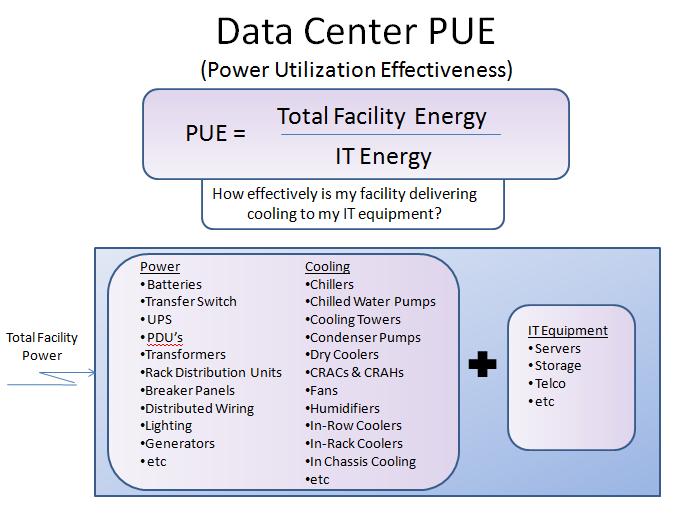
The energy to power a data center is composed of the power to drive the servers plus the power to cool the servers and any other ancillary devices such as PDUs, pumps and lighting. A common method for measuring the energy efficiency of a data center is PUE (power utilization effectiveness). The PUE of a data center is expressed in the relationship shown in Figure 1. A “good” data center is represented by a PUE of 1.2 or lower, suggesting that an additional 20% of the total power to operate the data center is powering non-IT equipment.
 
 
When reviewing the items that constitute the non-IT components of the calculations, the dominant parameters are related to the power required to drive the cooling systems. The role of CFD modeling in any of these designs is to insure that the cool air coming from the ducts, tiles or CRAH outlet reaches all the servers uniformly. This process of modeling the airflow and the resulting convective heat transfer is essential to the overall design and operation of a data center, particularly as it relates to failure-mode studies.
 
Cooling Failure Prediction
 
Failure model prediction is a key benefit that CFD modeling can provide. All cooling units need to be serviced periodically, and they completely fail occasionally. Predicting the thermal condition of the room ahead of the failure is vitally important to the data center operator. Knowing which servers will need to be shut down, or which cooling units are the most critical to the room, can be accurately and precisely predicted well in advance, and procedures can then be developed to follow in those cases.


What to Look for in a CFD Model

 
Here are some key factors to consider when seeking a CFD model:
 
  • User friendly: The last thing you need is another complex system—be sure to choose a model that is easy to use, is easy to understand and can be easy displayed to others (such as the C-Suite) who may not be as tech savvy.
  • Scalability: Be sure to choose a solution that will scale with you as new components (files, CRACs, racks, tiles, servers and so on) are added.
  • Cloud-Based: The cloud enables lower upfront investment, as it doesn’t require a dedicated server in your data center.
  • Flexible and Extensible: Be sure the system is flexible and extensible for integration with either upstream or downstream applications. For example, data from other DCIM applications can be fed directly into the system to speed model preparation.
  • Maximum Output: Look for a system that has options for output reports to ensure variety in how the information can be presented (graphs, charts, etc.). Every organization has its own methods, and this feature will benefit the usefulness of the data—it is meaningless unless it can convey the message to decision makers.

Adopted from http://www.datacenterjournal.com


Wednesday, November 7, 2012

Green Data Center Engineers Certification Program


In the 2011-12 Policy Address and the 2012-13 Budget, the Government will thoroughly support the conversion of industrial buildings into data centers and the accommodation of data centers in Tseung Kwan O which attract capital investment from global institutions. SOE, a chartered institute for operations engineers, who expertizes in mission critical facility / services, supports the policy and launches a professional training program to the Data Centre and ICT Industries in Hong Kong.
 
The certified program provides a technical knowledge and “green theory” for engineers who are involved in creating sustainable and energy efficient data centre (E&M) / plants or exploiting the role of telecommunication in helping deliver green operation and business practices to other areas of organization such as Tendering & Procurement. It also introduces other efficiency metrics and international standards such as PUE/DCiE (The Green Grid Energy Measuring Tools), Carbon Footprint, TPL accounting, end-to-end life cycle cost, TCO, etc.
 
 
Program Outline
 
(1)       Introduction of Green Data Centre
(2)       Concepts and trends of Green Data Centre
(3)       SWOT analysis of Green Data Centre
(4)       Green elements and Risk Analysis of Green Data Centre
(5)       Green Implementation Plan
(6)       Building an effective Green Data Centre team
(7)       Evaluation life cycle cost for Green Data Centre
 
 
Venue: 
Society of Operations Engineers - Hong Kong Region
Unit 2, 3/F, Winsum Industrial Centre,
588-592, Castle Peak Road, Cheung Sha Wan, Kowloon, Hong Kong
 
Date: 
15, 19, 22, 26, 29 November
and 3, 6 December 2012 (Every Monday and Thursday)
 
Time:
07:00 pm – 10:00 pm
 
 
Certification: 
A certificate of "Green Data Centre Engineers" will be awarded for those participants who completed the course assessment OR CPD certificate will be issued to students with attendance over 70%.
 
 
Enquiry:
Please contact Ms. Connie Mui at 3188 0062 or email: connie@soe.org.hk or visit http://www.soe.org.hk/pdf/15112012/15112012.pdf for moreinformation.


Wednesday, September 12, 2012

Moving Away from Data Center Raised Floor - Benefits of Overhead Cabling

Low-Voltage Cabling Distribution

Interconnecting the various IT resources in a data center requires large amounts of cabling (whether fiber, copper or a combination of the two). Perhaps you have seen mess of wires and cables that can quickly build behind your desk, especially if you have a number of connected gadgets; the situation in the data center can be much worse if not carefully controlled. Finding a good place for cabling that permits good airflow, accessibility for maintenance and expansion, and safety (for personnel and equipment) is critical.


Benefits of Overhead Cabling

From an energy efficiency standpoint, overhead cabling eliminates one major source of airflow obstruction, helping reduce the likelihood of hot spots. According to an APC by Schneider Electric white paper (“How Overhead Cabling Saves Energy in Data Centers”), “The decision to place network data and power cabling into overhead cable trays can lower cooling fan and pump power consumption by 24%.”

But another major benefit is accessibility. Instead of being under the floor—and possibly all but inaccessible owing to the arrangement of equipment above the floor or the hassles of lifting floor tiles—overhead cabling can be entirely accessible, easing the process of maintaining existing cables or adding new ones. A TechTarget.com article (“Using overhead cables to tidy your data center: Ask the Expert podcast”) cites Robert McFarlane, a principal at consulting and technology design firm Shen Milsom and Wilke, as identifying another tremendous advantage: “avoiding the need to comply with article 645 of the National Electrical Code (NEC) and the dangerous Emergency Power Off (EPO) button that article requires.” The EPO button is a perennial source of headaches for data center operators: it has been mistaken for a variety of purposes, including a door opener, to the catastrophic detriment of data center uptime. Of course, McFarlane is referring to the use of overhead cabling for power cables in this context. But it is worth noting that the overhead cabling concept can also apply to power cables, delivering the same airflow and maintenance benefits on the facilities side as it does on the IT side.

Thus, if implemented properly, overhead cabling can improve both data center efficiency and uptime — a dual win. But the key is doing so in a way that avoids some common pitfalls.


Friday, August 10, 2012

Cloud Computing and Data Center Facilities Design

During the early days of data center design and management, facilities teams were able to run their own environments with only minimal interaction with other IT teams. Over the past few years, however, the sitution has been changed.


Impacts of Cloud


The effects of the cloud take numerous forms. When it comes to data center design and management, cloud computing can be a truly powerful tool. Consider the following:

  • Datacenter consolidation. With advancements in virtualization, IT facilities managers can now reduce the amount of physical data center resources that are directly in use. This means fewer servers and better resource utilization. This reduction in data center space can result in more intelligent computing and better cost management.

  • Monitoring and management. As a direct result of cloud computing, new monitoring and management tools have made the modern data center easier to control. Monitoring features are able to look at metrics such as workload balancing, server environmental statistics and even check for alerts and alarms. Working in a distributed environment settings has created the direct need for better management software. Facilities managers should take this into consideration and see how cloud-ready tools can help their environment.

  • Reconsidering HVAC. With a reduction in the physical footprint as a result of cloud computing and virtualization, facilities administrators are able to create a more efficient environment with better cooling and management practices. With cloud computing, there will be new requirements as far as how much environmental control will be required. This can be either a positive or negative, depending on the cloud approach. If a private cloud is being built onsite with new, integrated architecture, there may actually be a need for more cooling requirements, even if the footprint is less. On the other hand, offloading a cloud platform to a public provider can result in less cooling and power needs.

  • Disaster Recovery. A big benefit of cloud computing is the ability to replicate an entire data center to a remote facility (or numerous remote facilities). The other major consideration is the fact that these cloud-based DR data centers can be provisioned on demand with a pay-as-you-go model. This means facilities administrators won’t have to worry about their remote infrastructure until the time comes for a DR event. Of course, testing and constant monitoring of the secondary environment is always key.

  • On-demand computing. Instead of having systems being in a state of always on – facilities and IT teams can coordinate to ensure that a portion of that infrastructure is cloud-ready and provisioned only on demand. This means fewer data center components and less idle machines. More environments are looking to cloud providers to help them offload certain types of workloads and better their physical data center efficiencies.

  • Data management and warehousing. The conversation around “big data” is growing. More environments are seeking answers and solutions to how they can better manage their ever expanding database needs. Many times this means adding more shelves to a SAN and storing yet more data onsite. With cloud computing, facilities managers can leverage outside, WAN-based resources, to host some of their data needs. This means possible offloading or archiving massive amounts of data for quick retrieval, but making it all cloud-based.

  • Decentralizing the data center. Resiliency, redundancy and efficiency are always at the top of any facilities person’s list. A part of that process is to reduce single points of failure within a data center as well as making data more quickly to the end-user. With cloud computing, facilities can extend their environment and utilize more resources on-demand. This decentralized methodology can help offload hardware from an existing data center, create a more redundant system, and ensure that data can be placed closer to the end-user.

Thursday, August 2, 2012

Data Center Raised Floor and Cooling System

Data Center Executives are addressing the cooling infrastructure demands with a full line of airflow management and in-floor cooling solutions. The continued adoption of high density equipment, virtualization and cloud computing strategies requires the cooling infrastructure of a data center to be capable of adapting to high and often variable heat loads while offering superior energy efficiency.

There are line of in-floor cooling products for raised floor data centers can nearly eliminate by-pass air and save significant energy. Using directional airflow and variable-air-volume dampers, the data center can instantly react to any variation in utilization to match cooling with the heat load at the rack level. Some data center also provide fan assisted airflow to eliminate hot spots or implement high-density equipment in a current raised floor facilities without significant capital investment.

In addition, a full line of containment systems and air sealing grommets is designed to help reduce by-pass airflow, improve energy efficiency and increase data center capacity. More information can be found below.


Electronically controlled variable air volume damper used to adjusts the amount of air to meet the specific needs of the rack it services.


Fan assist module is designed to provide a blast of cooling through an individual airflow panel. This powerful solution is ideal for solving the toughest hot spots in a data center.


Grate panels the airflow angle toward the equipment achieving a 93% Total Air Capture (TAC) rate by a standard server rack.


Full line panels have the unmatched ability to handle heat density needs of the most demanding mission critical facilities.


Blade damper allows the user infinite airflow adjustability when it comes to airflow from any airflow panel.


Seal a variety of openings in the aisle, blocking bypass airflow and maximizing cooling performance.


The rack shield isolation system is designed to capture subfloor supply and dedicate it to the computer thermal load, thereby ensuring that cold supply air will not spill across the raised floor.


Hot and cold aisle containment, Partition, Strip Doors, Retracting Roofs, Hinged and Sliding Doors all work together to create the perfect containment solution.


The CRAC Hood Extension is a ceiling return duct that connects the top of the CRAC unit directly to a ceiling return plenum greatly increasing cooling capacity and efficiency by capturing hot exhaust air and channeling it directly into the CRAC unit.